How I got the idea?
It was during the last days of Nintee (my last startup stint, early 2024), a hyper-productive sprint where our team was shipping app prototypes weekly. For one such prototype, Paras (our CEO) had a funky, yet brilliant, hypothesis: almost everyone in the tech sphere wants to be productive and read long-form content, but is simultaneously addicted to short-form content (Reels, TikToks, Shorts).
The goal was simple: bridge the gap. Turn the boring, text-heavy productivity content into the consumable, engaging format of a reel.
I was entrusted with building the initial Proof of Concept (PoC) along with my colleague and friend, Aakash. We had a blast. The timing was perfect - ChatGPT had just launched the previous year, and GenAI was beginning to show its potential for creative applications.
Fast forward to now (October 2025), I’ve decided to rebuild the entire pipeline from scratch based on that original idea and my recollections of what we built. The prototype we shipped back then proved the concept worked, but this version, what you’ll find in the repo (linked below) is a complete reimplementation with newly available tools. I’m calling it ReelCraft.
What is ReelCraft?
ReelCraft is a fully automated video generation pipeline. You paste an article URL, and out comes a professional-grade short video, perfectly formatted for social media.
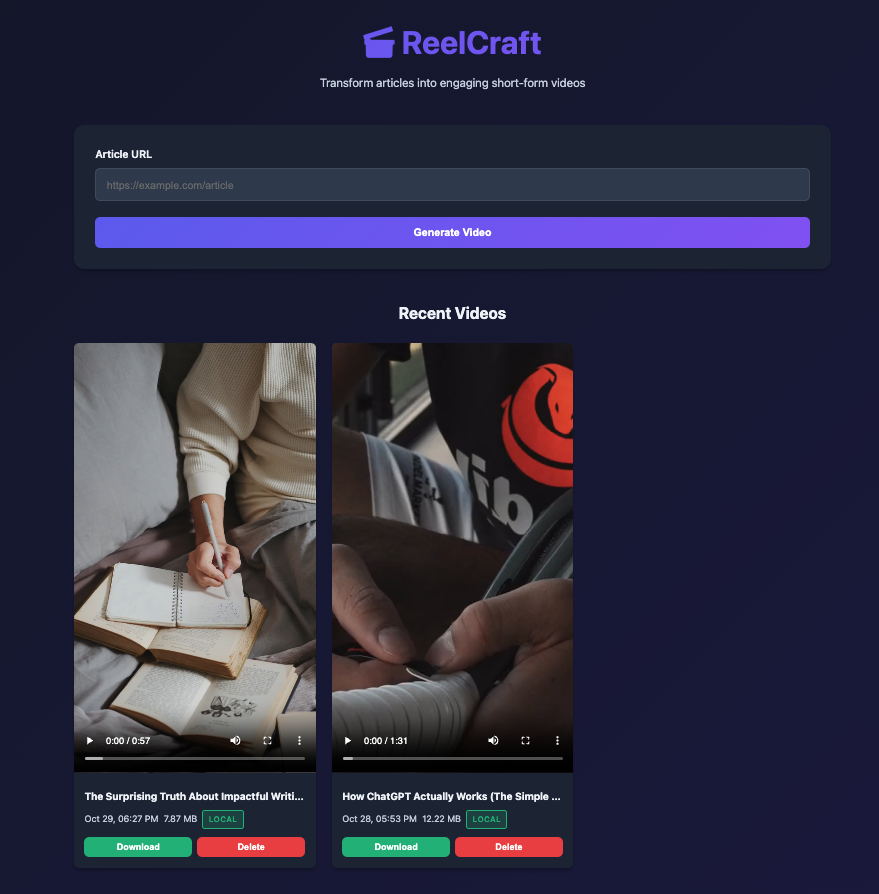
Want to see it in action? Check out a sample reel generated from Paul Graham’s essay.
The Flow: URL to Reel
Five-step pipeline:
Article URL
    ↓
Content Extraction
    ↓
Script Generation
    ↓
Audio + Asset Generation
    ↓
Video Editing
    ↓
Final Video
System Design: How It All Fits Together
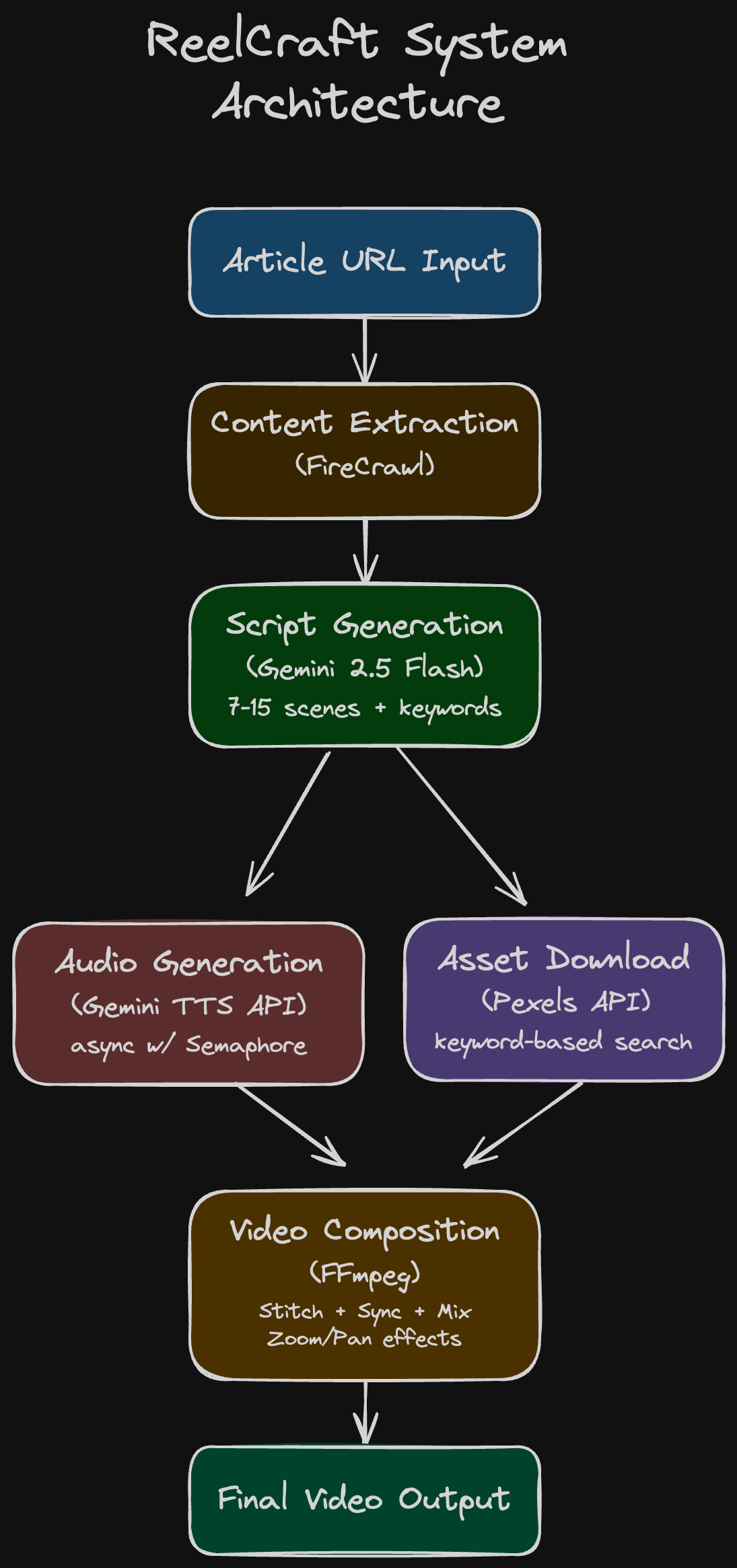
1. Content Extraction (FireCrawl)
The first challenge is getting clean, structured text from a messy web page.
- We use FireCrawl for this. It handles JavaScript-rendered content and returns the article in clean Markdown, ready for the LLM.
2. Script Generation (Gemini AI)
This is the core intelligence. A prompt is sent to a Gemini model (Gemini 2.5 Flash) that instructs it to perform a few crucial tasks:
- Create a compelling title.
- Break the article down into 7-15 scenes (max 60 seconds total duration).
- For each scene, generate the narration text and 3 descriptive keywords for visual search.
The idea is to extract as much from the LLM. Generation of script using the article context. Extract as much details as possible. So we let the llm decide how many scenes to be there. Each screen object would have 2-3 fields.
{
    "scene_number": 7,
    "script": "Younger minds have more room to grow.",
    "asset_keywords": [
        "brain growth",
        "mind blown",
        "lightbulb moment"
    ],
    "asset_type": "video"
}
Here’s the link to the full version of the prompt on GitHub.
3. Audio & Asset Generation (Parallel Processing)
These two tasks run concurrently to minimize latency:
- Audio Generation: The narration for all 7-15 scenes is converted to separate
.wavfiles using the Gemini TTS API. We use anasyncio.Semaphoreto limit concurrent requests (e.g., max 3 at once) to avoid API rate limits. - Asset Download: Using the keywords from the script, the pipeline calls the Pexels API to download the most relevant image or video for each scene, ensuring it matches the required vertical aspect ratio.
4. Video Composition (FFmpeg)
The final assembly line, driven by the robust FFmpeg utility:
- Stitching: Visual assets are concatenated sequentially.
- Duration Sync: This was a key challenge: the audio duration must precisely match the visual duration. Instead of speeding up audio (which sounds unnatural), we measure each voiceover’s duration and trim/loop the video assets to match. This keeps the narration sounding natural while maintaining perfect sync.
- Audio Mixing: The voice-over audio track is layered with a background music track, with the voice-over volume boosted and the music volume suppressed (e.g.,
background_volume = 0.2). - Effects: Basic effects (like zoom/pan for static images) are applied to maintain visual dynamism.
The FastAPI Backend & Web UI
The entire system is wrapped in a FastAPI application, providing both a REST API (/api/generate-video) and a WebSocket connection (/ws) to stream real-time progress updates to the frontend. This allows users to see exactly when the script is generating, audio is downloading, and FFmpeg is composing.
Evolution of the Pipeline
Building this pipeline wasn’t a straight line. Here are the key pivots and improvements that came from actually testing the system:
Problem #1: The Audio Syncing Issue
-
We let the LLM decide both the script content and the duration for each scene.
-
But we forgot the simplest thing that the time it takes to actually speak a sentence varies wildly depending on the TTS voice, speaking rate, and punctuation. The LLM’s “5-second estimate” would come out as 7.3 seconds in reality, creating awkward gaps or cuts in the video. lol.
-
We flipped the logic. Now, the TTS generates the audio first, we measure its actual duration, and then we trim/loop the video asset to match that exact length.
Problem #2: Getting Better Visual Matches
- The assets generated were not as much contextual as we would have liked but generic results - you’d get a stock photo of a brain when you really wanted “brain growth animation” or “neuron firing visualization.” In a way this was understandable as we were just sending single keywords to Pexels (e.g., “brain”, “success”, “graph”). Knew that we needed to fix this somehow.
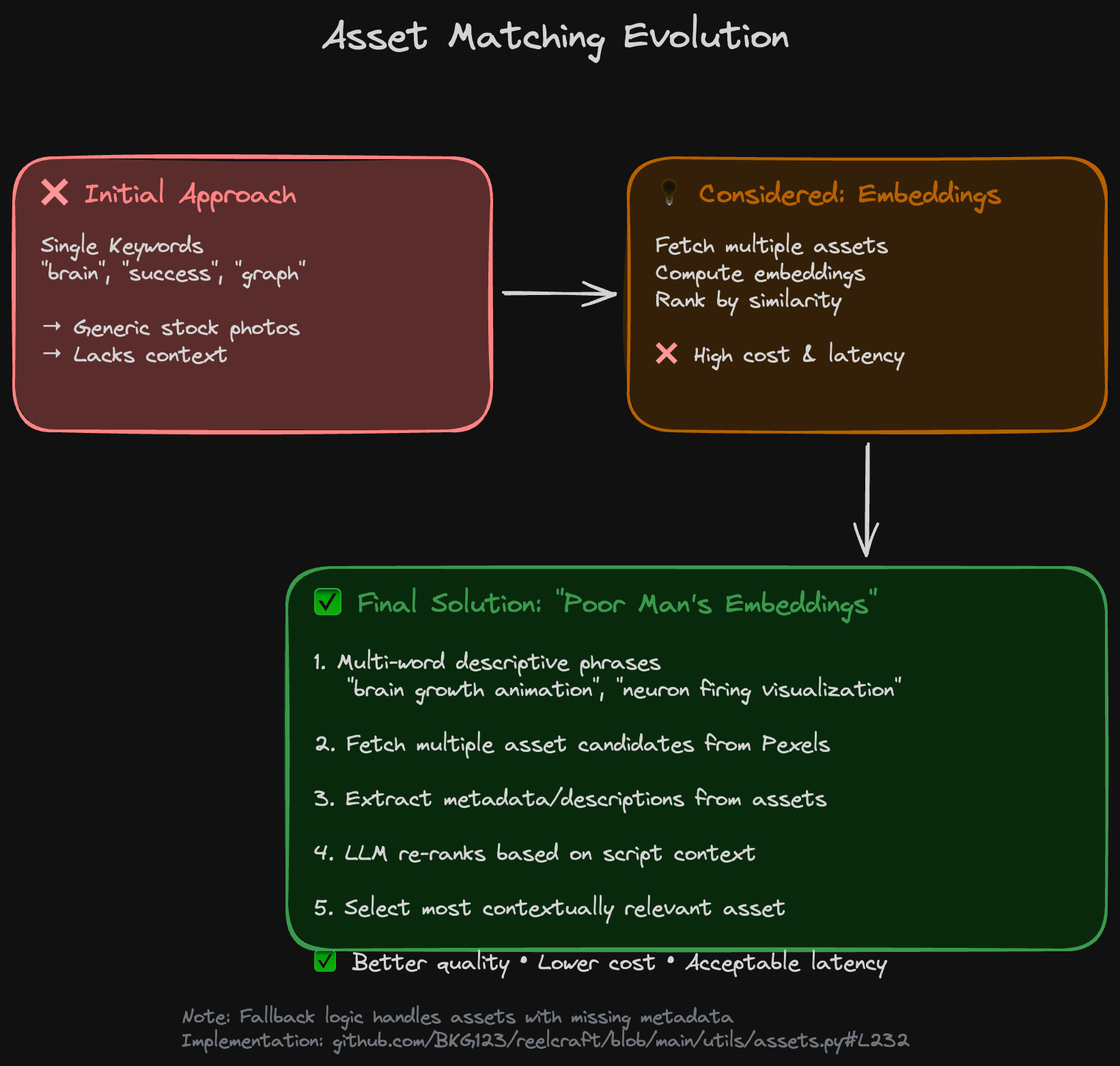
- While discussing this problem with Claude, it suggested using some sort of embeddings of the assets that we were fetching (fetch multiple instead of 1) and then use the most relevant. But this involves costly actions (both in terms of actual cost of API and also latency). Brainstormed a bit more and had a couple of ideas. Use multi-word descriptive phrases as keywords. And, implement a poor man’s version of the embedding approach - download multiple asset options, get their descriptions (or infer from metadata), and then use the LLM to “re-rank” them based on the script context (using the metadata). So now, the AI picks the most contextually relevant asset from a pool of candidates. Not the most ideal approach and not without drawbacks as not always will the assets have proper metadata - have a kind of a weird fallback for it (code). But this also had a noticeable improvement in quality.
A Funny Bug Story
I hadn’t handled errors in the markdown extraction step properly. One day, I fed it an article about vector databases and indices. The system churned away, generated the reel, and I sat down to review the quality.
A few minutes into the video, I noticed something odd. The narration wasn’t about databases at all-it was reading out error messages. “Failed to parse markdown. Unexpected token at line 47.” The whole reel was about errors. lol.
Turns out, when FireCrawl failed to extract clean markdown, it returned an error object, which the LLM dutifully turned into a “script” about… errors. I obviously fixed the error handling after that.
What’s Next?
This project is now in a usable state, but here’s what I would like to do next:
- Add Subtitles: Info-related reels have those and it’s obviously the most logical next step.
- Better Context: The context of the assets can be better. Have to find a optimised way of doing this.
- Better Audio: There are some inconsistencies in the tonalities of one scene to another because each section is converted using TTS independently. Need to fix this.
- Evals: Any LLM-based app should have proper evals - can’t just depend on eyeballing things.
Tech Stack:
- AI: Google Gemini (script generation + TTS)
- Scraping: FireCrawl
- Assets: Pexels API
- Video: FFmpeg
- Backend: FastAPI + SQLite + WebSockets
- Cloud: Cloudflare R2 (optional)
The code is open source on GitHub. Feel free to fork it, break it, and make it better.
If you made it this far, thanks for reading. It feels so good to be able to share that we built something which might not be as awe-inspiring now as we have SOTA video gen models like SORA and all, but we did it way back in early 2024 😎.
More from my blog
- Frame AI: Building an AI-Powered Photography Assistant - How I built an AI system that analyzes and enhances photos while teaching me
- Everything in Life is Linear Regression - Why life’s complexities are best understood as weighted combinations of multiple factors
- Coding in the era of LLMs - My thoughts on AI-assisted coding and the importance of learning fundamentals
- Your Feelings Lie to You (Sometimes) - My exploration of how emotions and logic shape our decision-making process