Introduction: The Mobile Photography Itch
Every developer will tell you this: “I want to work on a side project to improve my portfolio.” But almost all of them will also admit they never got around to building it. I wanted to break that loop, so I started hunting for ideas. I’ve always been fascinated by photography. Never professional-level good, but I can click half-decent pics on my iPhone. One of my friends introduced me to amateur photography principles - rule of thirds, leading lines, proper lighting. I try to keep those in mind while taking snaps. More often than not, I fail, lol. That’s when the idea hit me: What if I could analyze images using vision LLMs (like Gemini 2.5 Flash) by prompting them correctly to check alignment with widely accepted photography rules? As I was iterating on the project, Google launched Gemini 2.5 Flash Image (nicknamed “nano-banana” by the developer community) in August 2025 - a breakthrough in image generation and editing that hit #1 on LMArena’s leaderboards. I thought, why not edit the images based on the analysis? So yeah, in short: Frame AI analyzes images and critiques them, and you can enhance images using Gemini 2.5 Flash Image.
Try it here: https://frame-ai.bejayketanguin.com/
GitHub: https://github.com/BKG123/frame-ai
Video Demo: Watch it in action →
Why build Frame AI as a side project:
- Bridge the gap between taking photos and knowing how to improve them
- Explore the AI + photography intersection
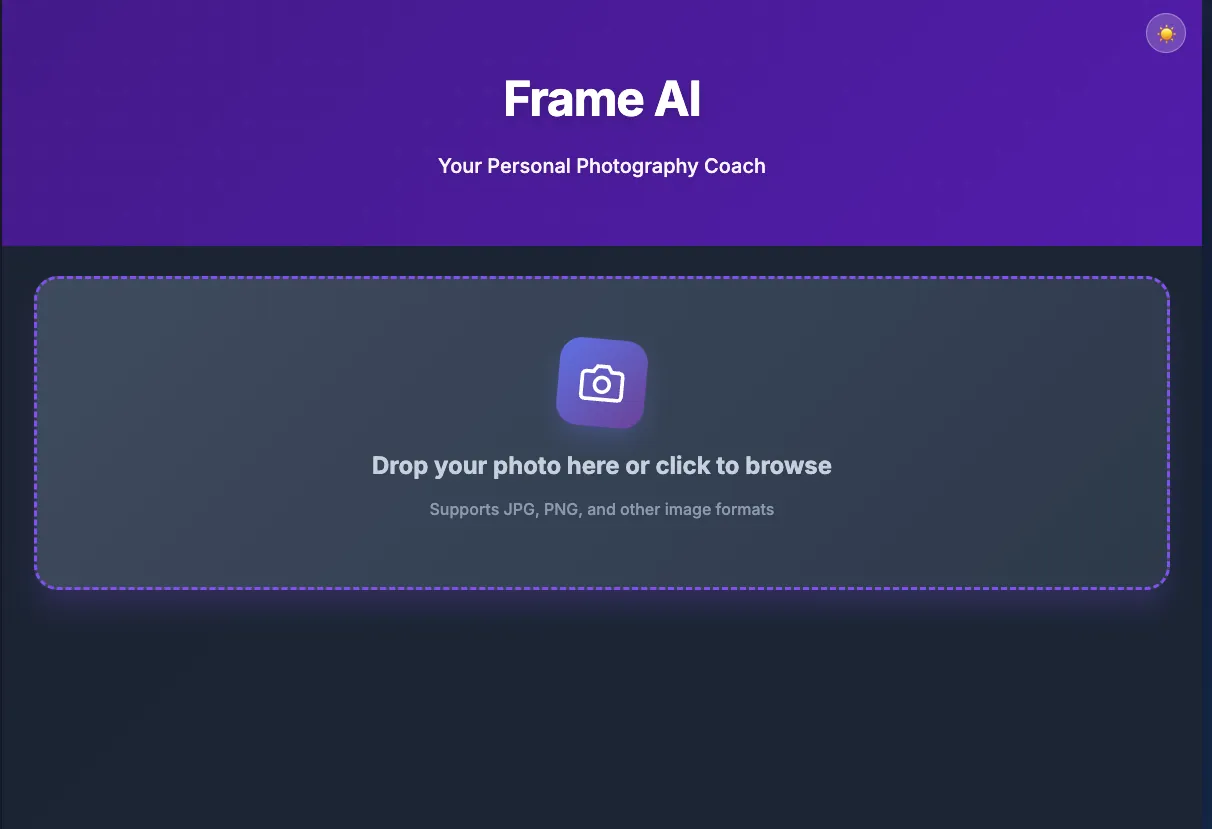
What Frame AI Actually Does
So the core idea is simple: an AI assistant that actually understands photography principles.
Not just “make it prettier” - I wanted actual compositional feedback. There are fixed rules in photography: rule of thirds, leading lines, lighting, balance, and so on. Frame AI analyzes your photo against these principles and tells you what could be better.
Two main things it does:
- Analysis: What’s working, what’s not, and why
- Enhancement: AI-powered edits based on the analysis
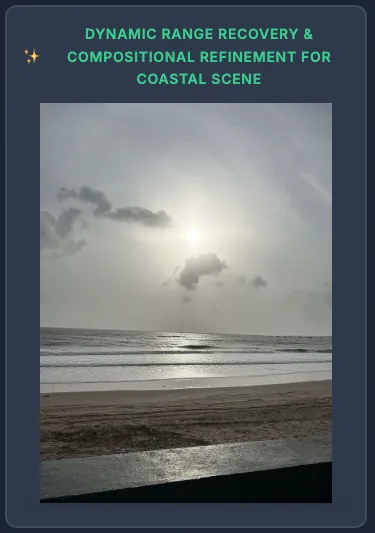
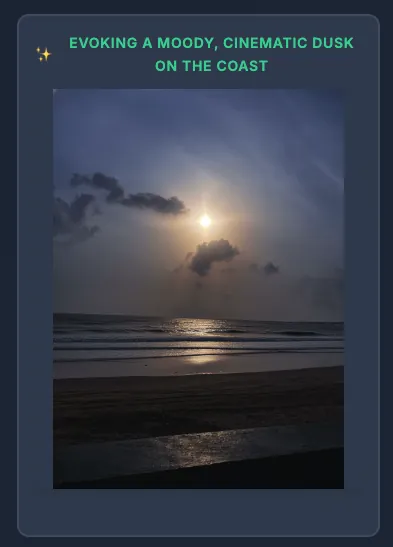
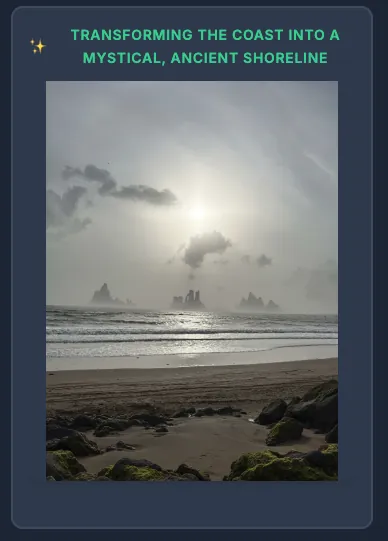
The interesting twist: Instructions generated separately -> So basically I make a separate call to the LLM to generate 3 distinct editing prompts from the analysis, each focusing on different aspects: technical perfection, atmospheric reinterpretation, and conceptual narrative. It also has access to the best practices of Gemini 2.5 Flash Image prompting techniques.
Earlier I was passing the analysis directly to the image generation prompt but the output wasn’t that good. My intuition was that Gemini 2.5 Flash Image excels at generating or editing images when given clear, specific instructions. I shouldn’t depend on it to reason and then generate - separation of concerns works better.
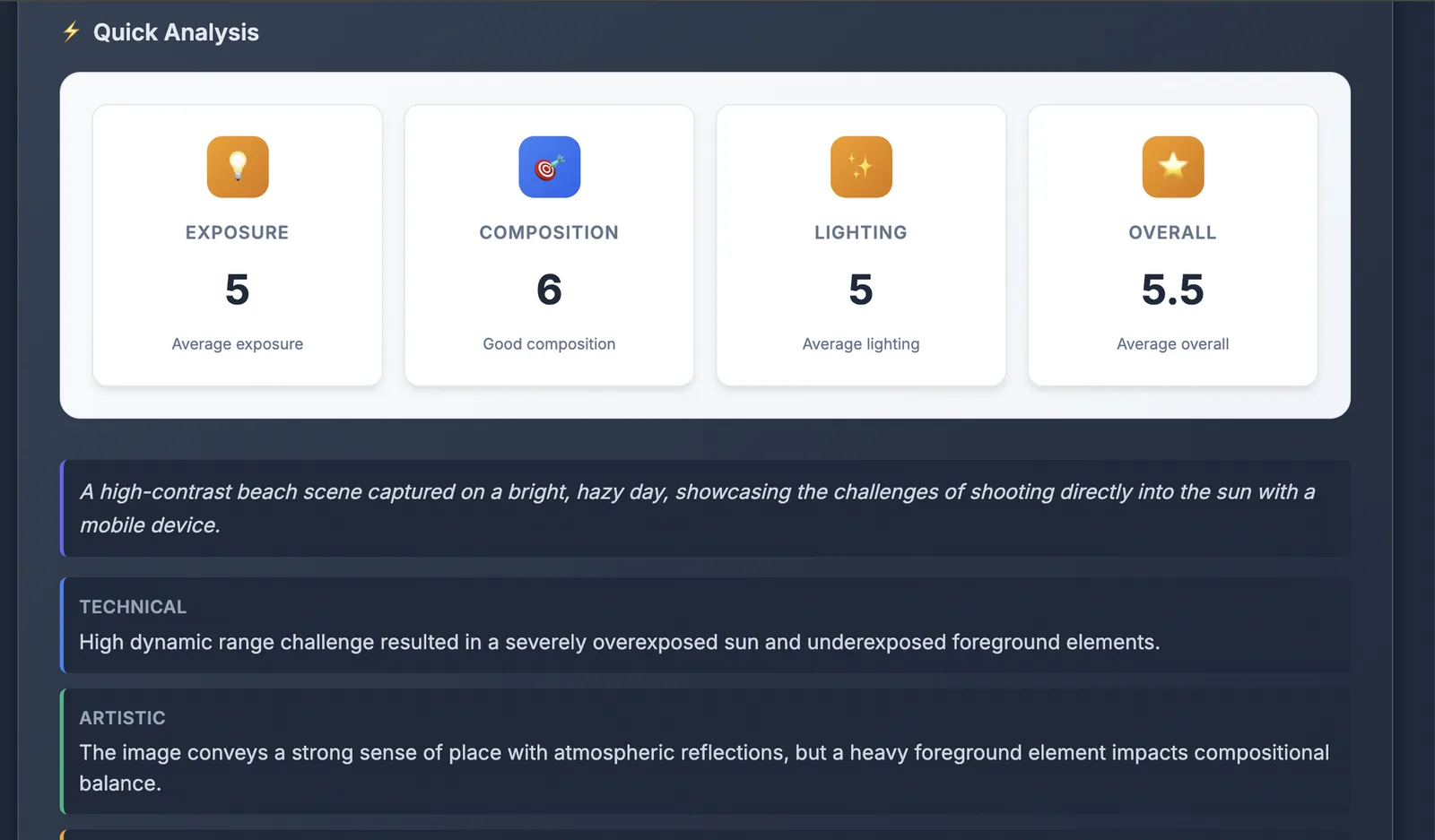
System Design: How It All Fits Together
High-level architecture:
User uploads image → FastAPI backend → Image processing & caching layer → LLM analysis → Stored in DB → Enhance Image Trigger → 3 editing prompts generated from analysis → 3 images generated in parallel using Gemini 2.5 Flash Image
Key components:
- Database: SQLite
- LLM Integration: Gemini 2.5 Flash for analysis, Gemini 2.5 Flash Lite for JSON structuring, Gemini 2.5 Flash Image for enhancement
- Caching Strategy: Content-based hashing prevents duplicate processing (performance + cost optimization)
- API Design: RESTful endpoints with Server-Sent Events for streaming analysis
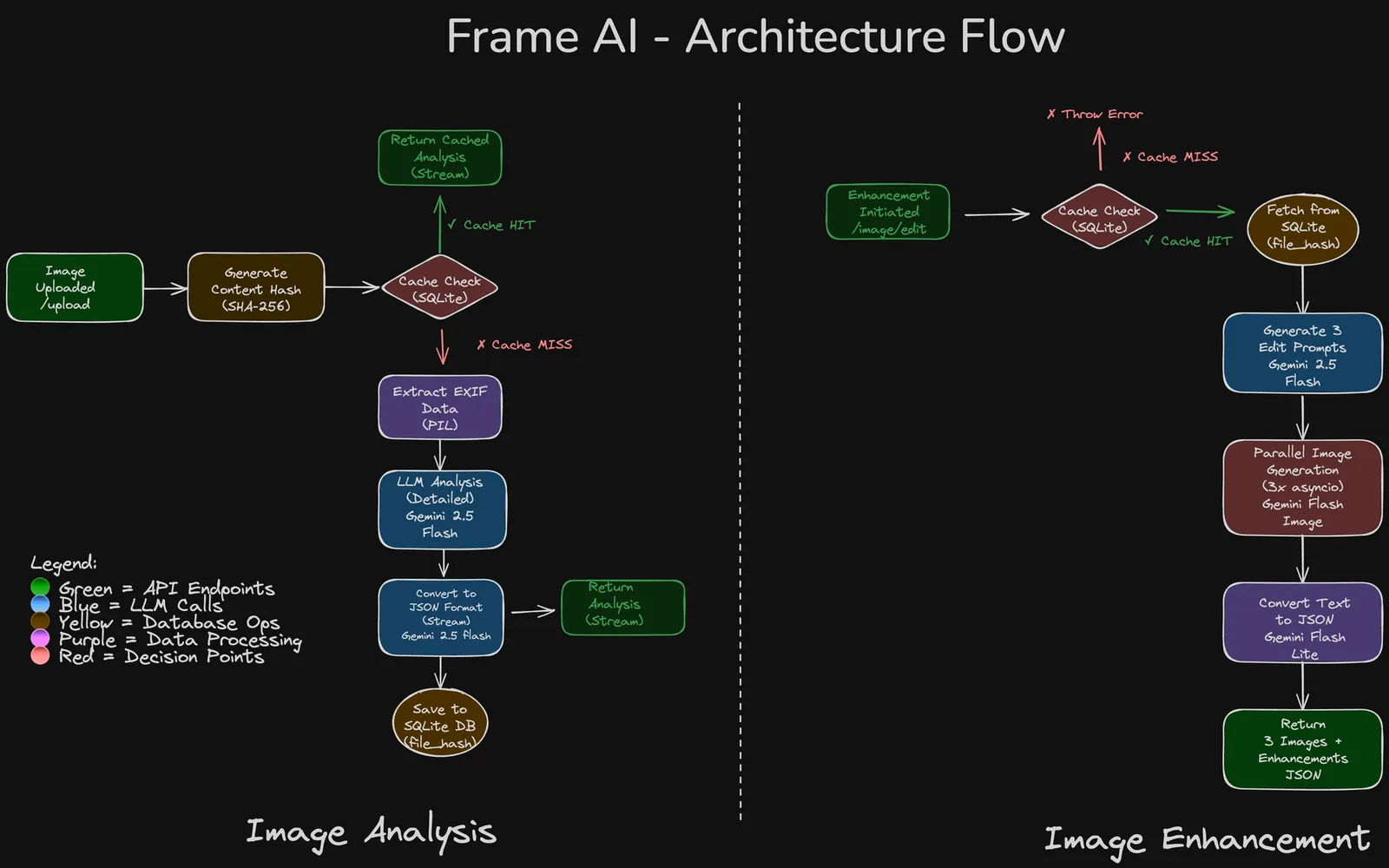
As mentioned earlier, the product has two main parts: image analysis and image enhancement.
Image Analysis Flow:
- Frontend calls
/uploadAPI with image file - Backend workflow:
- Content-based hash is generated from file bytes (fixes duplicate detection edge cases)
- Image stored permanently in
static/uploaded_images/{hash}.{ext}(deduplication happens here) - Check SQLite cache - if hash exists, stream cached analysis immediately
- For new images:
- Temporary file created for processing
- Gemini 2.5 Flash call with image + photography best practices prompt
- LLM streams detailed analysis with scores (exposure, composition, lighting, overall)
- Analysis stored in SQLite against file hash
- Frontend receives analysis via Server-Sent Events (real-time streaming)
- EXIF data extracted and stored for context
Image Enhancement Flow:
- Frontend calls
/image/editAPI with file hash - Backend workflow:
- Fetch cached analysis from SQLite using hash
- Generate 3 distinct editing prompts via Gemini 2.5 Flash (with Gemini 2.5 Flash Image best practices as context)
- Prompt 1: Technical perfection & enhancement
- Prompt 2: Atmospheric & mood reinterpretation
- Prompt 3: Conceptual & narrative composite
- Launch 3 parallel Gemini 2.5 Flash Image API calls (
asyncio.gather) - Each call returns: enhanced image + text description of changes
- Text descriptions converted to structured JSON via Gemini 2.5 Flash Lite (temperature = 0 for consistency)
- Return 3 enhanced images with metadata to frontend
Design Decisions & Lessons Learned
Decision 1: Content-Based Hashing for Caching
Why I needed this:
- The analysis needs to be reused for enhancement (same image = same analysis)
- Duplicate uploads waste API calls and cost me money
- Better UX: instant results if someone already uploaded that image
How I figured this out:
- First attempt: Filename + IP-based caching
- Problem: Same filename, different image = cache collision (oops)
- Problem: Storing IP addresses = PII concerns (not great)
- Final solution: Content-based hashing (SHA-256 of file bytes)
- Same image content → same hash → reliable cache hit
- Different images → different hashes → no false positives
- Privacy-friendly: no PII stored
Decision 2: Three Parallel Image Variations
Why not just one enhanced image?
- Photography enhancement is super subjective
- The analysis covers multiple things (technical stuff, artistic vibes, mood)
- People want choice - what looks “better” varies by taste and what you’re using it for
- Three variations let you see different creative directions
The three approaches I settled on:
- Technical perfection: Fix exposure, sharpen details, recover dynamic range
- Atmospheric reinterpretation: Transform mood through color grading and lighting
- Conceptual narrative: Reimagine the story (subtle compositing, creative edits)
Hyperparameter tuning:
- Analysis LLM (Gemini 2.5 Flash): temperature = 0.3-0.5 (balance creativity with structure)
- JSON structuring (Gemini 2.5 Flash Lite): temperature = 0 (deterministic output)
- Prompt generation (Gemini 2.5 Flash): temperature = 0.5 (creative but focused)
Decision 3: Separate LLM Call for Prompt Generation
What I tried first: Passing the analysis directly to Gemini 2.5 Flash Image
- Problem: Output quality was all over the place
- The image model struggled to pull out actionable edits from my verbose analysis
What actually worked: Dedicated prompt generation step
- Generate 3 specific editing prompts via Gemini 2.5 Flash
- Include Gemini 2.5 Flash Image best practices as context
- Pass clean, focused instructions to the image model
Why this works better: Gemini 2.5 Flash Image is great at following clear, step-by-step instructions - but I shouldn’t ask it to reason about photography theory and generate images at the same time. Separation of concerns wins again.
Results: Way more precise, actionable edits. The enhancements became subtle but actually comprehensible instead of over-processed.
Decision 4: Design Constraints & Negative Prompting
What I explicitly told the models NOT to do:
- Don’t add objects/people that weren’t in the original (authenticity matters for photography)
- Don’t rotate or change orientation (preserve the photographer’s intent)
- Don’t over-process to the point of looking fake
Some UX stuff I care about:
- Keep feedback digestible - no one reads walls of text
- Focus on enhancement, not transformation
- Make AI feedback feel specific, not generic
Trade-offs: Cost vs. Quality
My current approach: Optimize for quality first
- I’m making multiple LLM calls per request (analysis + prompt generation + JSON structuring)
- Not worrying about cost during initial development
- Philosophy: Get the best results first, then optimize later
Future optimizations I’m thinking about:
- Replace JSON-generating LLM calls with markdown parsers
- Use Python imaging libraries (Pillow) for simple adjustments instead of hitting the image generation API
- Maybe fine-tune an open-source model for analysis
- Batch processing for multiple images
The Metric Saga
What happened: I added metrics tracking. Then I removed it.
Why?
- I tried to give some quantitative insights using LLMs to calculate metrics like sharpness, color composition
- Problem: The generated image is completely new, not a modified version of the original
- So metrics might show “improvement” but they’re comparing apples to oranges - not super useful
Some Challenges & Solutions
Front end development
Problem: I know very little FE dev
Solution:
- In this day and age you can’t really bracket yourself into FE and BE. And also I couldn’t really show my product via APIs!
- Claude Code came to the rescue. It really spun up the FE based on my instructions. There were multiple iterations in a loop of claude doing something in FE -> Me not liking it -> putting ss in the input and asking it to rebuild. Also used Cursor’s in built browser tool to let it gather info of current FE design and make some tweaks.
- Attached the index.html file to Gemini and chatgpt and asked them to make it better but it was more or less the same thing.
- I felt that the design was not that great so used lovable to make some changes. Turns out, you can’t load an existing repo there. So created a dummy repo and pushed my code base there, connected to lovable. It couldn’t preview, but it added some animations to the buttons.
- The current state of the FE is not great but it gets the job done
Orientation
Problem:
- The edited image came out in incorrect orientation because probably, iPhone photos (with which I was testing) had incorrect EXIF rotation metadata
Solution:
- Used Pillow’s
ImageOps.exif_transpose()to auto-correct orientation before processing - Explicitly added in the prompt to maintain orientation
- Both of these changes were suggested by Claude code and applied them at the same time -> seemed to fix the problem
Making AI Feedback Actually Useful (Not Generic)
Problem: Early versions gave generic feedback like “nice composition” or “good lighting” that didn’t help users improve.
Solution:
- Crafted a detailed system prompt with specific photography principles (rule of thirds, leading lines, etc.)
- Included EXIF data in the prompt so the LLM could explain technical settings
- Asked for structured feedback: strengths, improvements, professional tips
- Added numerical scores (1-10) for exposure, composition, lighting, overall
- I arrived at this after multiple iterations.
Example of specific vs. generic feedback:
- ❌ Generic: “The lighting could be better”
- ✅ Specific: “The main light source creates harsh shadows on the subject’s face. Try shooting during the ‘golden hour’ or using a diffuser to soften the light.”
Evals (planned)
- This actually is an extension of the previous point.
- Till now I haven’t written ‘LLM Evals’ as such. Have some test cases which checks whether the json structure expected and some heuristics on length.
- Have plans to write proper evals for analysis - using LLM as a Judge method (have used this at work)
- Have some ideas about image evals from Storia-AI
- Will update this blog, after implementing evals
What’s Next
Some improvements I want to make:
- Evals: Any LLM-based app should have proper evals - can’t just depend on eyeballing things
- Cost optimization: Consolidate LLM calls, maybe use open-source models for some tasks
- Batch processing: Upload multiple photos, get bulk analysis
- Feedback over time: Track a user’s uploads and help them get better at photography over time
Open questions I’m still thinking about:
- How do I balance automation with creative control? (Should I let users tweak prompts? Add sliders for “enhancement intensity”?)
- What makes AI feedback feel “authentic” vs. generic? (Still experimenting with prompt engineering)
- Should I add a “learn from feedback” loop where users mark helpful vs. unhelpful critiques?
Conclusion: The Side Project Effect
Now that I’ve shipped my first “Side Project”, I hope to be consistent and keep building new things at regular intervals. And also keep improving this one, obviously.
Try it, break it, let me know what you think: https://frame-ai.bejayketanguin.com/
More from my blog
- ReelCraft: AI-Powered Article to Video Pipeline - How I built a system that transforms articles into engaging short-form videos
- Everything in Life is Linear Regression - Why life’s complexities are best understood as weighted combinations of multiple factors
- Coding in the era of LLMs - My thoughts on AI-assisted coding and the importance of learning fundamentals
- Your Feelings Lie to You (Sometimes) - My exploration of how emotions and logic shape our decision-making process